
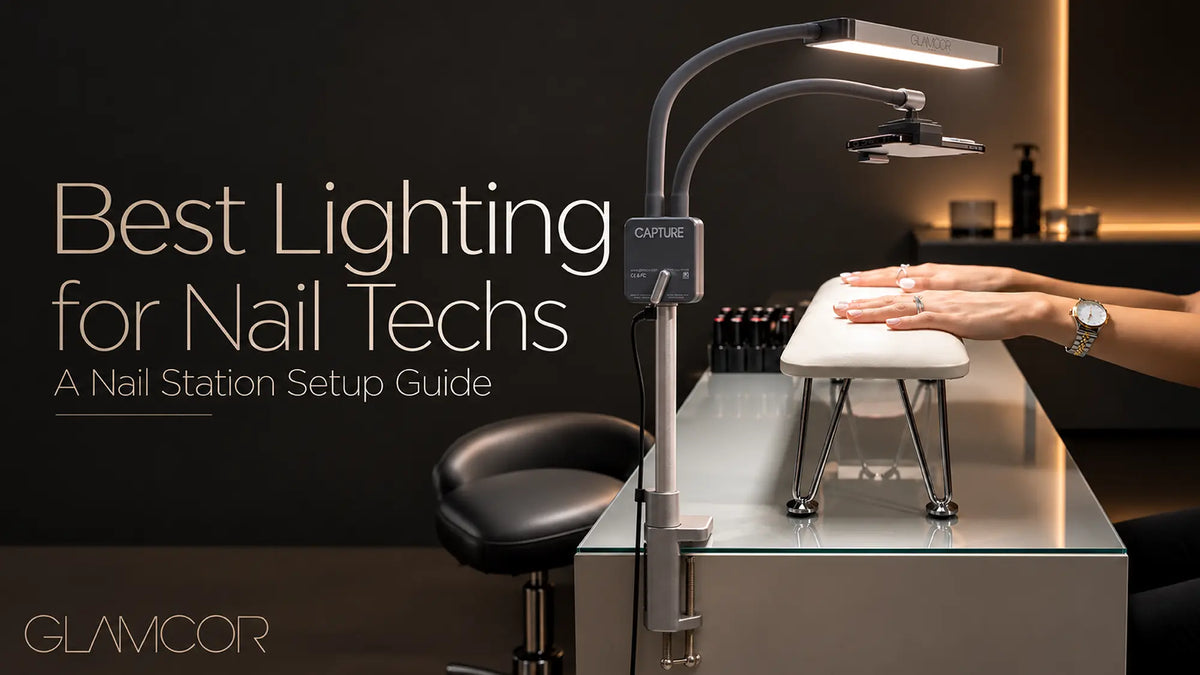

Detailed nail work requires clear visibility. Cuticle detailing, shaping, polish application, chrome finishes, and nail art can be harder to see when a workstation is dimly or unevenly lit.
A professional nail station may also need space for tools, an armrest, a dust collector, a curing lamp, and a smartphone. The working light should illuminate the client’s hands without interfering with the service or occupying more workspace than necessary.
Quick Answer: A nail tech light illuminates the manicure workspace. A UV or LED nail lamp cures compatible gel products. They are different tools and are not interchangeable.
What to Look for in a Nail Desk Light
Coverage and Positioning
The light should illuminate the manicure area from the technician’s normal working position.
An adjustable light makes it easier to change the angle when repositioning the client’s hands, switching services, or recording content. It should be possible to direct the light toward the working area without obstructing the technician’s view or movement.
Brightness and Color Temperature
Dimming provides more control over the lighting level in different rooms and at different times of day.
Increasing brightness is not always the only solution. Adjusting the angle or distance of the light can also help manage glare and reflections on glossy polish, chrome, and embellishments.
Color temperature describes whether a light appears warmer or cooler. A fixed daylight light provides a consistent appearance, while an adjustable-color-temperature light allows the technician to move between warmer and cooler illumination.
Color temperature is not the same as color rendering. A specific Color Rendering Index, or CRI, should not be assumed unless the manufacturer publishes it.
Mounting and Workspace
A clamp-mounted light attaches to a compatible desk, shelf, or workstation edge. It can avoid placing a separate lamp base on the work surface, but the desk must provide a suitable mounting position.
A floor-standing light keeps its supporting structure independent from the nail desk but requires enough floor space beside the station.
Mobile nail technicians should also consider whether each destination provides a compatible clamping surface or enough room for a floor stand.
Phone Positioning
Technicians who photograph finished sets or record service content should consider where the smartphone will be placed.
An integrated phone holder can keep the phone close to the illuminated working area without requiring a separate tripod or phone stand.
Common Nail Station Lighting Formats
Nail station lighting is available in several formats. Clamp-mounted lights conserve work-surface space but require a compatible desk edge. Floor-standing lights remain independent from the desk but require floor space.
Half-moon lights provide a wide, curved lighting format, while ring lights are commonly used for camera-centered content. Their size, shape, and positioning may not suit every manicure station, so the choice should be based on the actual workspace rather than the appearance of the light alone.
How to Position a Nail Tech Light
The light should generally be positioned above or slightly in front of the manicure area rather than directly behind the technician.
- Place the client’s hand in the normal working position.
- Direct the light toward the manicure area from above or slightly in front.
- Check whether the technician’s head, hands, or tools block the illumination.
- Add the armrest, dust collector, and curing lamp, then readjust the light if necessary.

The exact position will vary according to the desk, service, and lighting format. The goal is to illuminate the working area without allowing the light or its support to interfere with the service.
Which GLAMCOR Lighting Setup Fits Your Nail Station?
GLAMCOR offers two relevant formats for nail stations: the clamp-mounted CAPTURE Pro Kit and the floor-standing MULTIMEDIA X Pro Kit.
Their main differences are mounting method, lighting configuration, and color-temperature control.

| Feature | CAPTURE Pro Kit | MULTIMEDIA X Pro Kit |
|---|---|---|
| Support format | Table clamp | Floor-standing telescopic stand |
| Lighting format | One LED light bar | Two flexible LED light arms |
| Color temperature | Fixed 5600K daylight | Adjustable from 2700K to 5600K |
| Brightness control | Five dimming stages | Smooth dimming |
| Flicker-free | Yes | Yes |
| Phone positioning | Universal Phone Clip included | Universal Phone Clip included |
| Workspace requirement | Compatible desk, shelf, or workstation edge | Available floor space beside the station |
| Consider it when | You want a compact clamp-mounted light and phone setup | You want lighting support independent from the nail desk |
Not sure which configuration fits your workspace?
Compare GLAMCOR professional lighting kits.
CAPTURE: A Clamp-Mounted Nail Desk Light
The CAPTURE Pro Kit combines one 5600K LED light bar with five-stage dimming in a clamp-mounted format.
Its two flexible arms allow the light and Universal Phone Clip to be positioned separately around the workstation. Before choosing CAPTURE, confirm that the desk or shelf provides a compatible edge for the included table clamp.
MULTIMEDIA X: A Floor-Standing Lighting Setup
The MULTIMEDIA X Pro Kit uses a telescopic floor stand and two flexible LED light arms.
It provides smooth dimming and adjustable color temperature from 2700K to 5600K. This format keeps the lighting support off the nail desk but requires enough floor space beside the station.
The Pro Kit also includes a Universal Phone Clip, remote control, USB fast-charging port, and carry bag with trolley sleeve.
Lighting for Nail Photos and Video
A nail station light can also support photography and video when the light and smartphone are positioned around the same working area.
- Position the phone above or beside the manicure area.
- Direct the task light toward the nails rather than toward the camera.
- Adjust the angle to manage reflections on glossy polish and chrome.
- Review a test image or video before recording a full service.
Both CAPTURE and MULTIMEDIA X include smartphone positioning and flicker-free illumination. MULTIMEDIA X also provides adjustable color temperature for additional control over warmer and cooler lighting.
Lighting alone does not determine the quality of the final image. Camera position, exposure, background, and editing also affect the result.
Frequently Asked Questions
What is the difference between a nail tech light and a UV or LED curing lamp?
A nail tech light provides visible task lighting for the manicure workstation. A UV or LED nail lamp cures compatible gel products. One should not be used as a replacement for the other.
Where should a nail tech light be positioned?
Position it above or slightly in front of the manicure area and direct it toward the client’s hands. Adjust it if the technician’s head, hands, or tools block the illumination.
Should I choose a clamp-mounted or floor-standing nail light?
Choose according to the workstation. A clamp-mounted light requires a compatible desk edge. A floor-standing light keeps its support off the work surface but requires room beside the station.
Choose Lighting That Fits the Way You Work
The right nail tech light should fit the workstation, illuminate the main working area, and avoid interfering with the service.
Compare the mounting format, lighting controls, available space, and phone-positioning options before choosing a setup.
Share:
Ultimate Guide to LED UV Gel Lash Extensions in 2026: Benefits & Safety